|
<< Click to Display Table of Contents >> Version4.7 |
  
|
|
<< Click to Display Table of Contents >> Version4.7 |
|
Version 4.7.xx - June 29, 2015
Version 4.7 is an update to our programming language. You will need to download the complete install, available from the File menu in version 4.6.24.
For Version 4.7 we made:
•Additions: 70
•Changes and Tweaks: 30
Version 4.7.00-03 - June 29, 2015
Version 4.7.04-05 - July 15, 2015
•Added: New field to Labor categories. This is a field that if filled in, will automatically look to see if there is a matching List in the remider master list, then if available, trigger automatic reminders using the Master Reminder List.
•Added: Master Reminder List. Here is where you create reminders that can be triggered by Completed RO's that have labor items that have a matching list name.
Version 4.7.06 - July 17, 2015
•Added: New Report from RO Browse Screen that looks exactly like Invoice 16, but displays totals of labor logs for each labor item for each technician. The Icon is at the top of the screen.
•Changed: Labor logger now has the Company Name so it is easier to find the correct Repair Orders to log labor hours.
Version 4.7.07 - July 23, 2015
•Added: Vendor now has and Address 2 line.
•Changed: Vendor Address fields are now 40 characters (warning: that may not fit in many reports). City is now 25 characters. Capitalized name, address, city fields and made state field uppercase.
•Changed: Vendor Memo is now 1000 characters.
•Changed: Vendor Zip is now 10 characters and can handle Postal Codes.
•Changed: PO Printout. Part# is now first and part description 2nd. The part# does not get cutoff now by the part description
•Added: Report on Vendor browse to print the highlighted vendor record.
•Regression: Send Email or Text from RO screen (button) was disabled no matter what.. now it works.
Version 4.7.08 - July 27, 2015
•Added: Flat Supply Charges for Labor and Parts checkmarks. If you would rather a flat fee for either your labor supply charges or parts supply charges just click the checkmark and type in the amount.
Version 4.7.09 - August, 2015
•Updated the Help Files
•Updated 2 Technicial labor hours (labor logs) reports in the Report manager and renamed them to VMT Reports so they will be updated. (Only reports with the Prefix VMT can be installed over the top of Report Manager reports. This prevents you from losing reports you have modified. If you want to modify a VMT report, be sure to do a save As without the VMT prefix. This will also get backed up with your backup files.
•Added a view button to the Labor items for viewing labor items even after the RO is completed. This also gives you access to the labor logs. At this time, you can change the labor logs, but it will NOT change the labor cost or hours for the labor item for completed RO's.
•Added a view button to the Special Items in the Ro for viewing special items after the RO is completed.
•Added a tab for the reminder list so you can see exactly what will be Emailed out.
•Fixed the reminder edit form so you can see the vehicle information and/or select a different vehicle.
•Changed the Canned Package procedure so you can now add inventory/labor/special while you're creating a package.
•Fixed Statements. They were printing estimates and WIP's. Now it will only print Completed and Completed Diagnostics with a balance.
•
•
•
Version 4.7.10 - August 18, 2015
•Fixed: When changing the quantity of a part in an RO, the change didn't get reflected (in some cases) to the actual inventory quantity.
Version 4.7.11 - August 21, 2015
•Fixed: Upgrade to 2 files didn't work.. it's safe to update now.
•Changed: Toolbar at the top of the RO screen is now attached to the screen instead of floating. The floating bar would resize differently than the RO screen.
Version 4.7.12 - August 26, 2015
•More work on Help Files.
•Took the toolbar out of the main repair order screen... it was separating from the screen when you resized the program.
Version 4.7.13 - August 28, 2015
•Added: More Statuses. We had a request to have 16 or more statuses (right now they are the lights above the RO browse and in the RO screen. In order to do this we created a dropdown of descriptions of statuses that you can create in the Company setup. That is also where you choose if you want to use the lights (default), or the drop down status descriptions. You can make up about 34 statuses. 2 are reserved. 4 will still show the lights in the browse, any others will not show a different light in the browse.
•Fixed: The new SendTo button now works with the new report previewer when creating a PDF or a report.
•The Ammy program (remote support program) is no longer included in the install, but can be downloaded from the website. Go to Help/About/Contact Info and click on the link for Remote Support.
Version 4.7.14 - September 1, 2015
Version 4.7.15 - September 22, 2015
Note: Vehicles/Motorcycles/Boats/Computers, etc will be called Units in the documentation. Units are the items you repair... usually vehicles, but we have golf courses, computer shops, appliance repair shops and many more kinds of shops using Digital Wrench.
The concept here is to have a master list of units/vehicles/whatevers, that you can choose from when creating a customer unit. You can use your current (customers units) data to create a master unit list, or add them each time to the master list.
There is also a button to create a YMM lookup. YMM stands for Year Make and Model.
This lookup is versatile. If you select a year, it only shows the makes for that year, then you select a make, and it only shows the models for that Year and Make. However, if you just select a Make, then you'll see all the makes for all the years. This gives you many ways to use the YMM lookup to search your master unit file. The YMM lookup will be available where necessary in the future.
•Added: Unit Lookup file. This will let you select Units by Year/Make/Model. The file is called the YMM file.
•Added: Master Unit File. This file can have vehicles/units that are not directly associated with a customer. You can add units directly to the master list, or add a unit to the master list when you have the displayed customers unit on the screen.. there is an Add to Master button in the top right corner.
•The Unit Lookup File can be built from your current unit file. Go to the Master Unit List menu item located under the Customer menu. Click on the button that says 'Create YMM Lookup'
•Added: Unit Lookup on the Unit Screen. To use, click on the words Year, then Make, then Model. You can also insert a Year/Make/Model to the lookup file for future use. The Year/Make/Model Lookup will be used in several screens in the future.
•Added: Year/Make/Model Lookup and query to the Master Unit browse table. This will let you query by the Year, Make, or Model or all three.
•Added: Select Unit from the unit screen. This allows you to select a unit from the Master Unit File when you are creating a Unit for the customer.
•Added: Build Master Unit File Button. This lets you create a master unit file from your customers units.
•Added: Clone Unit Button. Highlight the unit, click on clone.
•Added: Drag and Drop from Master Unit List to the Year, Make, Model or Query buttons so you can query easier. If you drag a record to the query button, all 3 fields (year, make, and model) get filled in.. then just click query to do a year and make and model query.
Version 4.7.16 - September 25, 2015
•Added: Parts History Browse, located under Inventory Menu. This lets you set filters by both Date sold and/or vendor. The new SendTo option will let you print out the current view to your printer, or create a PDF, or Email the report as a PDF, or create a spreadsheet.
Version 4.7.17 - September 28, 2015
•Fixed: Supply Charges were not calculating correctly when deleting some items.
•Added: Help for Units/Vehicles and help for components
Version 4.7.18 - October 1, 2015
•Added: Shipping to Invoice 16.
•Tweaked: Invoice 16 to allow for more parts on the page.
•Update the help files.
•Fixed: Hourly Wage Report to allow wages more than 99.00 per hour.
•Added: To parts history browse a tab so you can also filter by category.
•Fixed: Parts in the RO were not getting the sold date filled in when the invoice was completed. This caused them not to show up in the parts history by date.
•Added: Fixdata, Special Fixes, routine to update all RO parts with sold date (which comes from the associated completed RO).
•Fixed: Browse in the $ did not let you use the locator.
•Fixed: Main RO Browse locator was not working.
Version 4.7.19 - October 13, 2015
•Fixed: Drop down in payment screen was also showing status fields if you had added status fields. It uses the same data table.
•Added: Flat Rate. There is now a check mark in the list labor and the RO labor record for Flat Rate. If flat rate is checked, the calculation for the total changes from multiplying by the hours to just replacing the total with the labor rate.
•Changed: Flat rate gets brought in from package pricing and selecting the labor list also brings in the flat rate (check mark). You can override the flat rate if you uncheck the flat rate mark in the labor item in the package price and the 'Get Price from Here' is checked.
Version 4.7.20 - October 15, 2015
•Added: Editing capability for cash files and cash history files. You must update the Master Security levels and you'll need a level 9 password. If you have no user passwords or security setup, anyone can edit.
•Fixed: Paid Outs using the Paid Out Screen (menu under cash files), could have other data if you previously looked at a cash record.
•Fixed: When transferring a completed RO back to an Estimate, the cash file was incorrect.
•Added: 2 Fields to the component record for documents, one for regular documents like a PDF or a Word Doc, and the 2nd for a video document. Player comes later.
•Added: 1 field to the component item. This is a document index for locating the part on the component document. For instance if I had a diagram with the parts labeled 1, 2, 3, etc., then this field is for that part number on the document.
Version 4.7.21 - October 21, 2015
•Changed: Year Make Model Lookup in the Unit/Vehicle works better.
•Added: You can now update master components from the Unit/Vehicle Screen or the component lookup on the RO screen, providing you first selected the Unit/Vehicle from the Master Unit List. If you didn't select from the master list, you can still add it to the master, but be careful or you could end up with the same unit(s) multiple times in the master list. Once the unit is added to the master list, you'll be able to update the master unit by updating the customers unit, then clicking on Add to Master.
•Added: More Help including links in the help to the YouTube Videos. This will help for training.
•Added: Component Icon/Button to the top of the RO Screen.
Version 4.7.22 - October 23, 2015
•Added: Capability to update the current Unit from the master unit record if you originally got the unit from the master unit record file. This gives the components a way to synchronise. So if someone add parts or components to a unit then updates the master unit file, another user that may have selected the unit from the master unit file can now 'update' their current unit.
•Changed: Buttons for Adding to Master change to Update Master if the unit has already been added to the master unit file.
•Changed: Top of the Unit Lookup screen on RO screen now shows the Unit information for Year, Make, and Model. There will also be two ** if the unit came from the master unit file (or was added already to the master unit file). This way you'll know if you can sync the unit with the master unit.
Version 4.7.23 - October 27, 2015
•Changed: Email Letter Merge to apply formatting to dates.
•Changed: Some Vendor lookups to incremental search locators (so you can just start typing and each letter searches out the vendor).
•Changed: Updated some help files.
•
Version 4.7.24 - October 28, 2015
•Added: Order Numbering available for parts within the Repair Order.
Version 4.7.25 - October 28, 2015
•A little quick to publish that last one... but we fixed and improved the Parts List Order so you can click on a part in the RO, Add Part or Add from Parts List and the next part will have the 'clicked on part order#' plus 5, so it will be added next in order. (if it doesn't work, it could be that you have an RO from a previous version that didn't have the list order numbers... so simply Re-number to make everything work.
•
Version 4.7.26 - November 4, 2015
•Changed: Icons for the parts and labor at the top of the main screen. Icons in the Parts package.
•Added: Mechanic Icon on RO screen on right hand side which allows you to select the technician.
•Tweaked: Colors on Parts package screen to match Parts, Labor, and Special colors on RO screen.
•Changed: Technician hours report now has AM PM times instead of military times. Also enlarged the font to 11.
•Regression: Invoice 14 logo was printing too large.
•Tweaked: Icons in many screens.
•Added: More icons to choose from for your business type, like ATV Icons, Boat Icons, truck icons, and more. In company setup you can setup your own business type.
•Changed: Help Files
Version 4.7.27 - November 9, 2015
Version 4.7.28 - November 24, 2015
•Added: Date and time range filter to Cash History Browse.
•Added: SendTo to Cash History Browse allowing for report or export to spreadsheet.
•Added: Different Sort orders to Cash History Browse.
•Added: Ability to order field columns in Cash History Browse.
•Added: New tab on the parts history for One Part only. This shows a list (history) of one part sold.
•Added: New Graph in the Parts History Browse. Highlight a part and click on the graph icon at the bottom of the screen.
Version 4.7.29 - December 8, 2015
•Added Security to FixData Program. You must have a level 9 to access most functions.
•Added capability to delete duplicate customers (customer ID's) by adding an asterisk '*' if the number is a duplicate (in Fixdata program).
•Added ability to delete duplicate invoice numbers. (This was to help those that had an ancient version of Digital Wrench).
•Added RO Graph(s) found under Cash Files / Browse Invoices. Click on the Graph Icon.
•Added Graph for invoices for date range selected which includes parts, special, labor graph plots.
•Added Graph for Monthly by year totals which lets you compare up to 5 years of monthly RO Totals
•Added Graph for Daily totals.
•Added Graph for Weekday totals along with a pie graph.
•Added Graph for monthly totals.
•Added Graph for Hourly totals.
•Updated help to include Invoice History screen.
Version 4.7.30 - December 17, 2015
•Added: New fields to RO that are automatically calculated, Total Parts Cost, Total Labor Cost, Total Special Cost, Total labor hours, total actual labor hours, and total parts quantity.
•Added: Screen to show total costs in invoice/RO/Estimate. Click on the Grand Total Button.
•Added: Total Cost and Profit to daily graph in the Invoice Browse Report area. You can get there under Cash Files Menu or under the Report / Browse Graph & Reports Menu.
•Tweaked: Graphs under Invoice Browse.
•Added: Totals to the Invoice Browse.
•Added: One Customer tab under the Invoice Browse. Find any RO, then just click on the One customer Tab and you'll see only invoices for that one customer. Filters above will also be applied. You can then create a report or spreadsheet with SendTo.
•Fixed: All six Profit Reports to include the Labor Costs when adding to All Costs.
•Added: Graph to $ screen for one customer.
•Added: Ability to change the order of Invoice Details; Labor, Parts, Special Via Company Setup. Currently Only Invoice 16 can change the order. More invoices will be changed upon customer requests. Custom Invoices using Report Manager will not work... yet.
•
Version 4.7.31 - December 28, 2015
•Added: Inventory History Graph to Inventory list display. Look for the graph button: 
•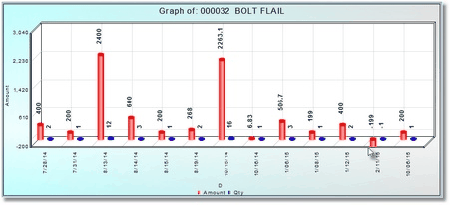
•This graph is available in parts lookup, All RO Parts History, and any parts history display.